クレジットカード不要 · 登録不要 No credit card · No sign-up
カメラで撮るか、声で話しかけるだけ。AIがイベント名・日時・場所を読み取り、iOS / Googleカレンダーに自動登録します。
Take a photo or speak naturally. AI extracts event details and adds them directly to iOS or Google Calendar.
むずかしい操作は一切ありません
No complicated setup required
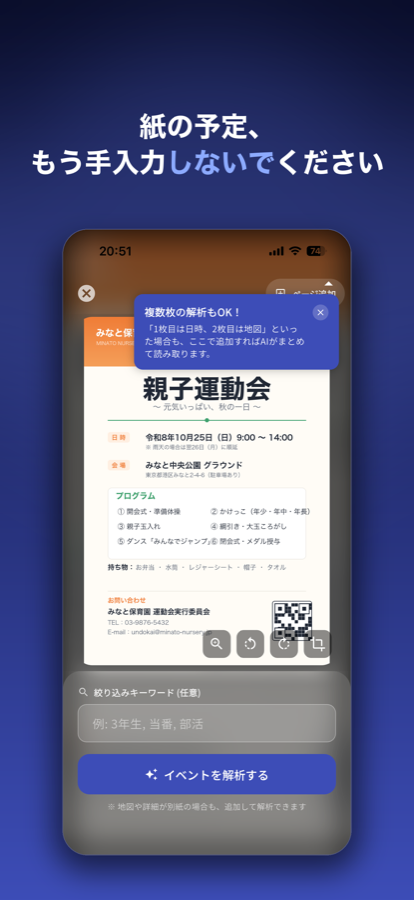
プリントをカメラで撮るか、「明日15時から新宿で会議」と話しかけるだけ。
Snap a photo or say "Meeting in Shinjuku at 3pm tomorrow."
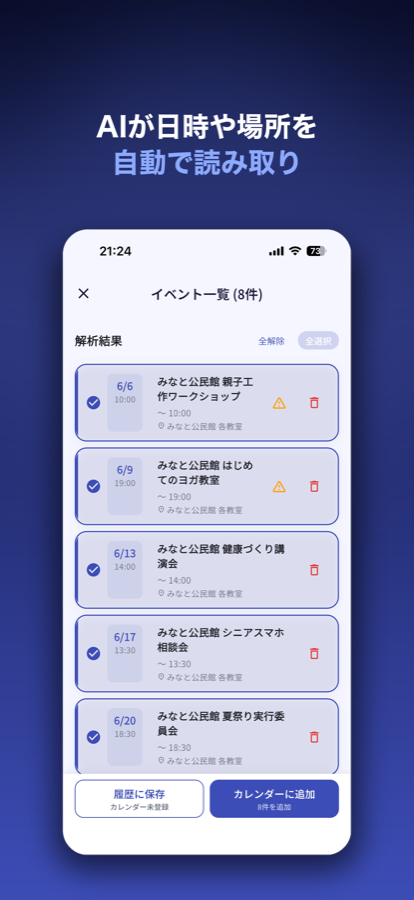
Gemini AIがイベント名・日時・場所・URLを自動で抽出。「開会式」→「◯◯祭 開会式」のように催し名まで補って具体的なタイトルで登録。縦書きや複雑なレイアウトにも対応。
Gemini AI extracts title, date, time, and location — and fills in the full event name (e.g. "Opening Ceremony" → "◯◯ Festival Opening Ceremony"). Handles complex layouts too.
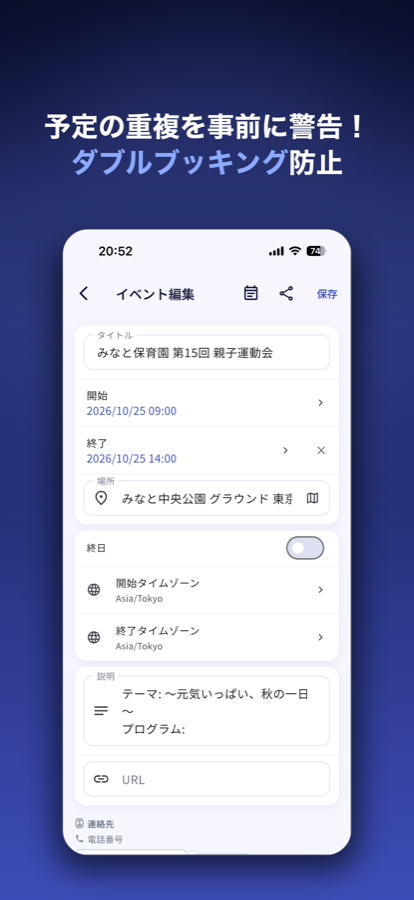
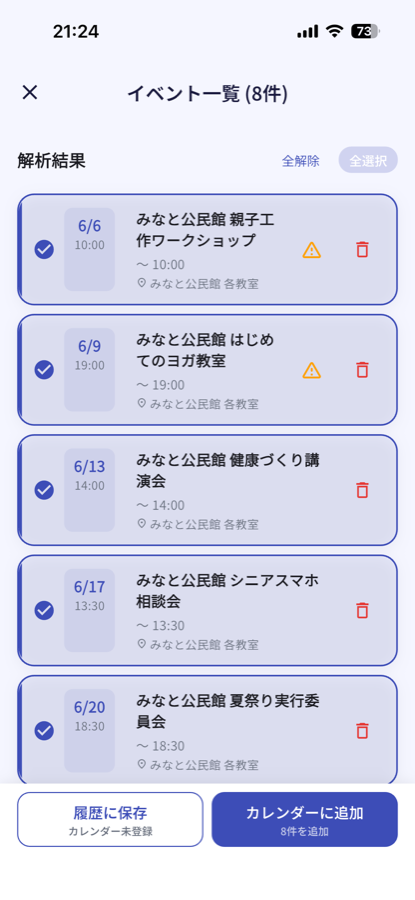
内容を確認してから登録できるので安心。重複チェックでダブルブッキングも防止します。
Review before saving. Built-in duplicate check prevents double-booking.
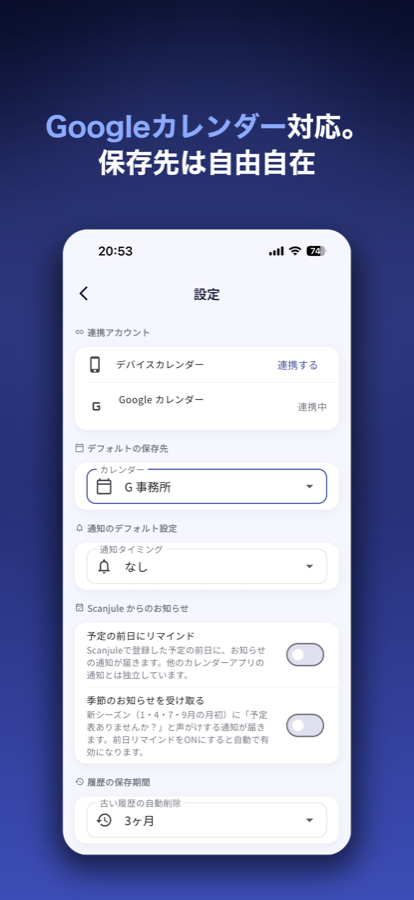
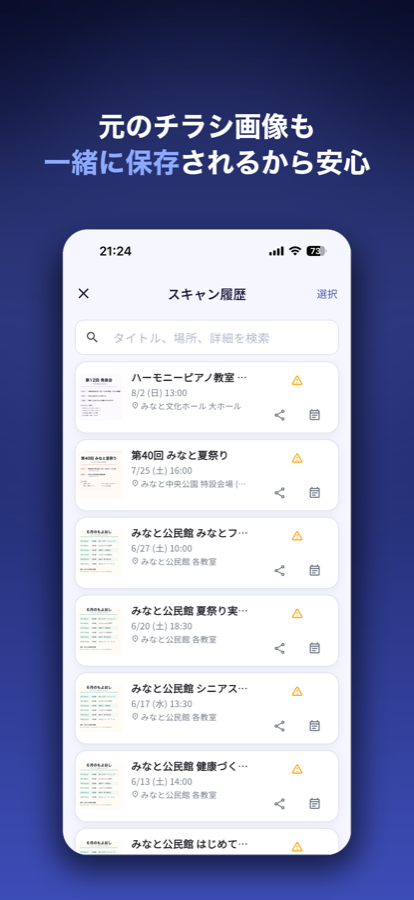
スキャンから登録、履歴まで。実際の操作画面です。
Real screens — from scan to calendar to history.


← 横にスワイプ → ← swipe →
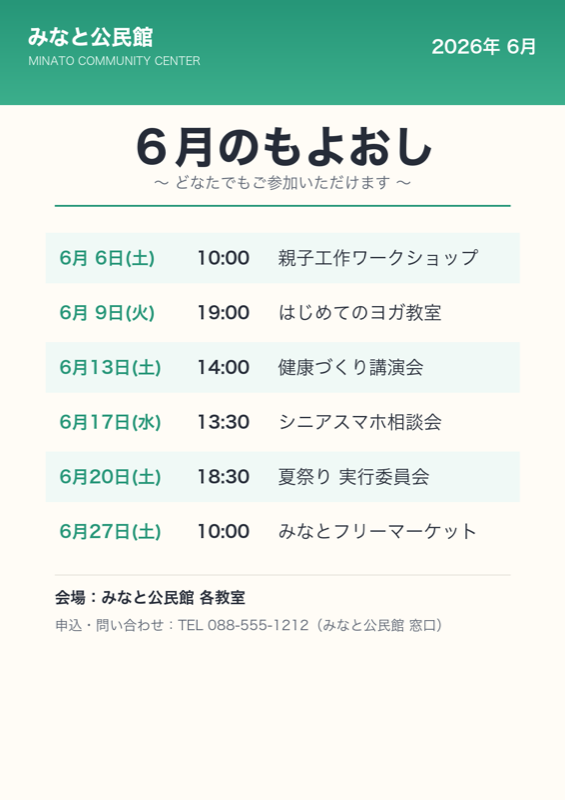
Gemini AIが実際に抽出する情報のイメージです。登録前に内容を確認・編集できます。
What AI actually extracts. You can review and edit before saving.
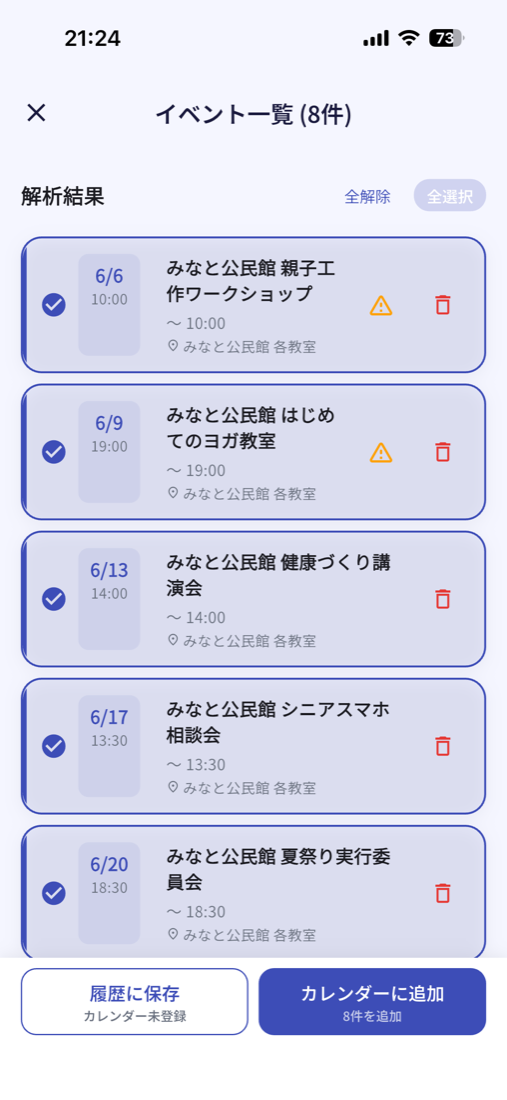
1枚の予定表から複数の予定をまとめて抽出。内容を確認・編集してからカレンダーに登録できます。 Multiple events extracted from a single sheet. Review and edit before saving to your calendar.
学校のお便り以外も、こんな書類に対応 It also handles documents like these
自分の名前を入れると、自分のシフトだけ抽出。
Enter your name to extract only your shifts.
開場・開演を区別して開始時刻を判定。
Distinguishes "doors open" from "start time".
現地時間を日本時間に自動換算。
Auto-converts local time to your timezone.
※ 実際の抽出精度はプリントの種類・状態により異なります。手書き文字は読み取りが難しい場合があります。
※ Accuracy varies by document type. Handwritten text may have lower accuracy.
プリント・チラシ・ポスターをカメラで撮るだけ。縦書き・複数イベント・複雑なレイアウトも対応。
Snap any notice or flyer. Handles vertical text and complex layouts.
「明日15時から新宿で会議」と話しかけるだけ。手が離せない時でもサクッと登録。
Say "Meeting at 3pm tomorrow in Shinjuku" — AI creates the event instantly.
iOS・Googleカレンダー両対応。登録前に内容を確認・編集できるので安心。ワンタップで完了。
Works with iOS and Google Calendar. Review before saving. One tap to confirm.
毎週の習い事や毎月の当番を、終了日を設定して一括登録。
Set daily, weekly, or monthly repeats with end dates.
シフト表で自分の名前だけを指定。自分のシフトのみを自動で抽出。
Enter your name to extract only your shifts from team schedules.
登録しようとする日時に既存の予定がないか自動確認。ダブルブッキングを防止。
Auto-warns if the slot is already taken. No more double-booking.
解析した予定をそのままLINE・メール・SMSで送信。家族や友人へのシェアがワンタップ。
Share parsed events via LINE, email, or SMS in one tap.
保存した予定の前日に通知でお知らせ。登録のうっかり忘れを防止。設定でON/OFFできます。
Get a notification the day before saved events, so you never forget. Toggle on/off in settings.
必要な部分だけ切り取って精度向上。複数枚を1つの予定に統合も可能。
Crop to the relevant section. Merge multiple pages into one event.
旅程表の現地時間を自動で日本時間に換算。海外旅行・出張に対応。
Auto-converts local times. Great for international travel.
元の画像を予定と一緒に保存。「あのプリントどこ?」がなくなる。
Original images saved alongside events. Find that flyer instantly.
iOS・Google以外のスケジューラーにも対応。ICS形式で書き出してOutlookなどに読み込めます。
Export as ICS to import into Outlook or any ICS-compatible calendar app.
「プリントが多すぎて管理できない」
"Too many school notices to keep track of"
「シフト表を手で打ち込む時間がムダ」
"Manually copying shift schedules is a waste of time"
ライブ・セミナー・地域チラシの予定をサッと登録。チケットを撮るだけでOK。
Concerts, seminars, local events — snap a flyer and it's in your calendar.
予定の手打ちが嫌いなすべての方に。声で話しかけるだけでも登録できます。
For anyone who hates typing events. Speaking works too.
🎉 現在は全機能を無料 でご利用いただけます。
クレジットカード不要・登録不要で今すぐお使いいただけます。
今後、有料プランの導入を予定しています。
🎉 All features are currently free.
No credit card, no sign-up required.
Paid plans will be introduced in a future update.
現在 全機能利用可
All features · Free right now
いつでもキャンセル可
Cancel anytime
約¥400 / 月
approx. ¥400 / month
有料プランはApp Store経由(RevenueCat)で今後導入予定です。
Paid plans via App Store (RevenueCat) will be introduced in a future update.
はい。AIが抽出した内容は確認画面で表示され、保存前に自由に編集できます。誤りがあっても安心です。
Yes. AI-extracted content is shown on a review screen where you can edit freely before saving.
はい。前日リマインド機能をオンにすると、保存した予定の前日に通知が届きます。お使いのカレンダーアプリの通知とは独立しているので、二重に設定する必要はありません。設定画面からいつでもON/OFFできます。
Yes. Turn on the day-before reminder and you'll get a notification the day before each saved event. It works independently of your calendar app's own alerts, and you can toggle it on or off anytime in settings.
画像はAI解析のためGemini APIに送信されますが、開発者のサーバーには保存されません。スキャン履歴はお客様のデバイス内にのみ保存されます。
Images are sent to Gemini API for AI processing, but are never stored on our servers. Scan history is stored only on your device.
縦書き・複数イベント・複雑なレイアウトには対応しています。ただし手書き文字や画質が低い場合は、読み取り精度が下がることがあります。確認画面で内容を修正してからご登録ください。
We support vertical text, multiple events, and complex layouts. Handwriting and low-quality images may result in lower accuracy. Always review before saving.
アプリ設定でGoogleアカウントにサインインするだけです。難しい設定は一切不要です。
Just sign in with your Google account in app settings. No complicated configuration needed.
はい。iPhoneの設定 → Apple ID → サブスクリプション → Scanjule からいつでもキャンセルできます。キャンセル後も期間終了まではご利用いただけます。
Yes. Go to Settings → Apple ID → Subscriptions → Scanjule. You'll keep access until the end of the billing period.
iOSカレンダー(iCloud・ローカル含む)とGoogleカレンダーの両方に対応しています。登録先はスキャンのたびに切り替えられます。
Both iOS Calendar (including iCloud and local) and Google Calendar are supported. You can switch between them each time.
はい。ICS形式で書き出せるため、OutlookやNotionカレンダーなどICS対応のスケジューラーに読み込めます。メインの直接登録はiOS・Googleカレンダー向けですが、ICS書き出しで対応の幅が広がりました。
Yes. You can export events as an ICS file and import it into Outlook, Notion Calendar, or any ICS-compatible app. Direct registration targets iOS and Google Calendar, but ICS export extends compatibility further.
はい。解析結果の画面からシェアボタンをタップすると、予定の内容をテキストとしてLINE・メール・SMSなどで送れます。学校のプリントをクラスのグループLINEに流すといった使い方に便利です。
Yes. Tap the share button on the results screen to send the event details as text via LINE, email, SMS, and more. Great for sharing school notices with a class group chat.
今なら全機能が無料。クレジットカード不要で今すぐ試せます。
All features free right now. No credit card required.
アプリを最新版(1.1.6)に更新しました。システム改善に伴い、旧バージョン(1.1.5以前)では予定の読み取り機能がご利用いただけません。App Store / Google Play から最新版へのアップデートをお願いいたします。 We have released the latest version (1.1.6). Due to a system improvement, versions 1.1.5 and earlier can no longer use the scan feature. Please update to the latest version from the App Store / Google Play.